Week #1: Introduction to ICT

Image result for Introduction to ICT

Let’s talk about computer

What come into your mind when you hear the word computer?

Technology? Programmable electronic device? Gadget? You’re right!

Computer by definition is a programmable electronic device that performs mathematical calculation and logical operation, specially are that can process, store and retrieve large amount of data very quickly.

But do you know that before we have our computer for today there are many evolution happens. Let’s go back in time were the computer revolutions begins.

In 1801, Joseph Marie Jacquard invented a loom that uses punch wooden card. In 1822, Charles Babbage conceive a steam driven calculating machine. In 1890, Herman Hollerith designs a punch card system to calculate census. In 1936, Allan Turing presents the notion of a universal machine ( Turing Machine). In 1937, J.V. Atanasoff  build the first computer without gear, cams, belts, or shafts. In 1943-1944, John Mauchly and J. Presper Fckert build the electronic numerical integrator and calculator (ENIAC). In 1947, William Shockley and John Bardeen and Walter Brattain invent the transistor. In 1958, John Kilby and Robert Noyce unveil the integrated circuit. In 1976, Steve Jobs and Steve Wozniak start apple computers.

So now, those evolution of computers close up your mind? In terms of evolution our computer has a big contribution in our nation up until now. So now, let’s talk about components of a computer.

Are you curious and confuse? So let’s begin! There are 4 basic components of computer (Input, Processor, Output and Storage). So without these component our computer is nothing. There are also different categories of computer (Personal Computer, Mobile Computer, Game consoles, Servers, Mainframe, Embedded computers. Do you know or agree that computer is smarter than us? In our time computer are uses to solve our needs or research so as of today, computers has a big blast in our life.

Computer in our time is very useful for is students. In this lesson I learned that computer were not use just a search engine but as time passes by computer are solving problems and some operations. We students must be aware on how to give care in computer because computer is a big help in our daily lives.

Week #6: Webpage Creation

Image result for Webpage creation

In today’s lesson
Let’s talk about “HTML” do you have any background about HTML ?

By definition HTML is a computer language that is used to create documents or web sites on the internet.
According to my research HTML or HyperText Markup Language is used to create some sites and pages.

HTML is first used in 1992
HTML have many tags and meaning,some are :

<A> </A> – the Anchor,
<B> </B> – content is shown as bold type,
<CENTER> </CENTER> – content is centered on page,
<HEAD> </HEAD> – The head part of the HTML,and
<P> </P> – paragraph

Reflection :
In this lesson about HTML I’ve learned that in creating sites or documents, HTML is a big help in doing it.
And we can learn the different types of tags so we can design your own webpage.
For me learning this kind of lesson is kinda exciting because you can manipulate what you want in creating some sites or pages.
I also know the acronym of HTML which is HyperText Markup Language.

Week #5: Online Platform

Related image

The function of Online Platforms is for us to be able to deliver benefits and also in business, also makes the consumer and producers together and allows to exchange that would otherwise not happen. Social Media platforms allows you to make not only personal accounts but also pages and groups that you can share any contents. Examples of social media platforms are Facebook, Google, LinkedIn, Weibo, DevianArt and Twitter.

In Content Management System (CMS) a computer application (sometimes online or browser-based) that can make you to publish, edit, manipulate, organize and delete web content. Also in Blogging Platforms, it focuses on content and design. It typically looks like a newsletter where you are given choices to change the design based on what you prefer. The examples of blogging platforms are WordPress, Joomla, Publisher, Tumblr and Wix.com.

Lastly File Sharing Platform, it is the process of sharing a file mass audience using internet. It allows sharing and accessing the file through an internet connection from an internet-based server or online data storage/sharing service.

In all this kinds of platforms, we can easily share our thoughts and also our knowledge about something for the benefits of everyone because there is saying that “It’s better to give than to receive”, so just continue to share your good thoughts and knowledge guys.

Week #4: Imaging and Design for Online Environment

Image result for imaging and design for online environment

Imaging and Design for Online Environment Imaging and design it helps the individual to improve their works in online environment. It also help our skills to be better or maybe one of the best . Imaging and Design for Online Environment is not just Photo Editing , in this Article you will know the softwares of Editing and the importance of it . Photo Editing is the process of alteration of images whether they are in digital , traditional photo chemical photographs or illustrations .

Examples of software for photo esitung are Adobe photoshop , Adobe lightroom , Coral draw and Gimp. Graphic Software programs are the primary tools which the user can manipulate , enhance the pictures or images . Software can be grouped in the vector graphs editors. Example of it are Adobe photoshop , Adobe illustrator , Coral Draw , Gimp , Inkscape , Blender , MS point and Paintools. Basic of Image Editing , it helps to enhance or to produce a new image . There are two (2) kinds of it, Raster Images and Vector Images . Raster Images stored in a Computer in the form of grid picture , elements of pixel . Vector Images use to create modify vector. Example of Vector Images is images with the file . Modelling can be displayed as 3D or 3 dimensional surface of an object or image through process called 3 rendering .

Image format is good to familiarize yourself with JPG, GIF , and PNG and their uses. Those are the three image formats used on web today . Knowing this Image format will lead our picture to be better. Image Manipulation is widely used to produce the picture or product , neat , clean and brightly. Photo Manipulation will help us to transform images to improve their feature in order to make the image preferable.

Infographics. Infographics is have been gaining popularity and become widely used amongst business and organization in both digital and print , according to the Third and Grove. Infographics are used to allow people to easily understand information through the use of visual , data , charts , and statistics.

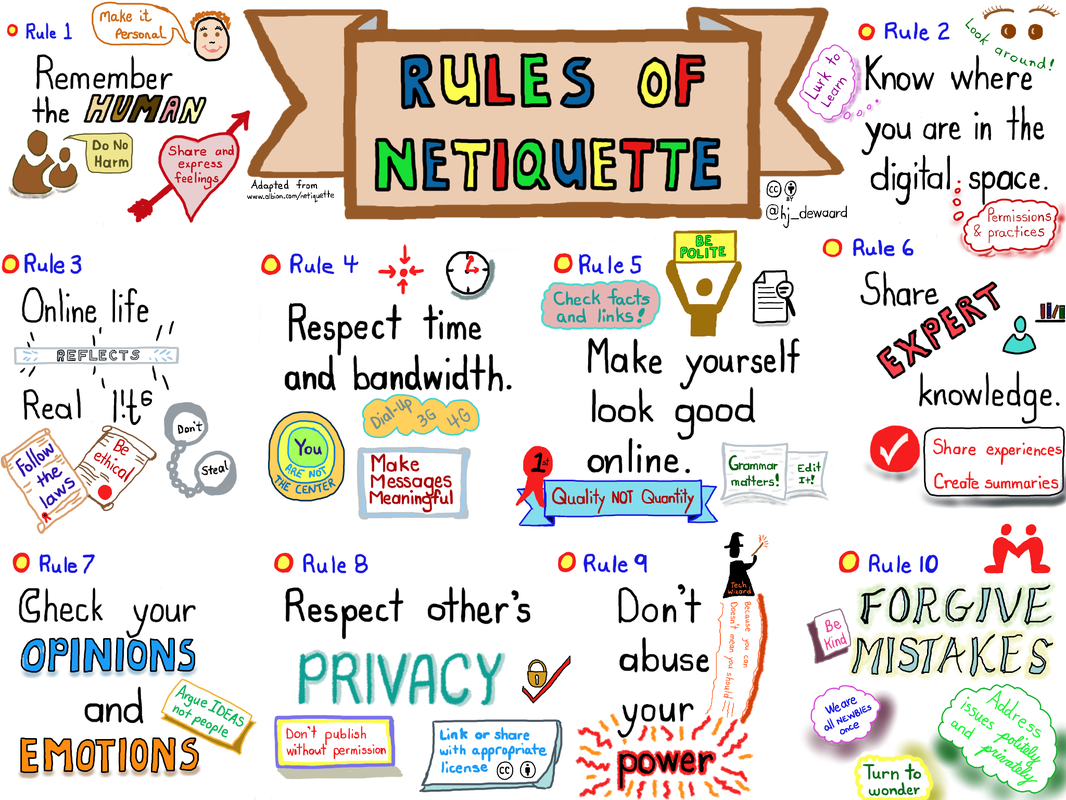
Week #2: Rules of Netiquette

“Netiquette” refers to Internet etiquette. This simply means the use of good manners in online communication such as e-mail, forums, blogs, and social networking sites to name a few and it consists of 10 rules:

Rule #1: REMEMBER THE HUMAN – This type of communication does not allow each person to see facial expressions, body language, or hear intonation. Because of this, messages can often be misinterpreted.

Rule #2: ADHERE TO THE SAME STANDARDS OF BEHAVIOR ONLINE THAT YOU FOLLOW IN REAL LIFE – Breaking the law is not good netiquette

Rule #3: KNOW WHERE YOU ARE IN CYBERSPACE- If you are in different place, make sure that you know where you are.

Rule #4: RESPECT OTHER PEOPLE’S TIME AND BANDWIDTH- If you are posting anything in social media make sure that it can help or they need it, don’t waste their time.

Rule #5: MAKE YOURSELF LOOK GOOD ONLINE- Be pleasant and kind, don’t use offensive words in communicating.

Rule #6: SHARE EXPERT KNOWLEDGE- Share your knowledge because it is fun, and it can make the world better.

Rule #7: HELP KEEP FLAME WARS UNDER CONTROL- Don’t post on social media that you are directed in one person and stop sending message which are written in all caps because it sounds like you are angry.

Rule #8: RESPECT OTHER PEOPLE’S PRIVACY- Failing to respect other people’s privacy is not just a bad netiquette.

Rule #9: DON’T ABUSE YOUR POWER- Having a power does not gives you the right to read the private e-mail of other people.

Rule #10: BE FORGIVING OF OTHER PEOPLE’S MISTAKE- When someone makes a mistake like for example wrong grammar or spelling be kind about it because no body’s perfect.

Rules of Netiquette gives me more knowledge on how to communicate in a nice way and how to respect the privacy of other people and now that I have knowledge, I will share this to others and apply it to myself. This lesson thought me not to trust immediately so that my files will be safe and secure. Following netiquette will help you to maintain and establish positive online relationships as well as develop a positive online reputation.

Week #3: Office Productivity

Related image

Office Productivity introduces the office tools available today. It helps to make us proficient in using the tools on doing school works, word processors, to help us prepare our paper works, reports, spreadsheets and data visualization.
More than just blink of an eye, office productivity can make our daily life more convenience. One of the major help of office productivity is our office design. Office designs directly affects your ability to focus and be productive at work.

Office Productivity is to emphasize the interoperability of the software being taught. Office Productivity used to advanced featured of software for data processing, presentation needs, electronic mail of communication, internet for research and data gathering and also for utilize computer resources and tools in a responsible and productivity manner.

According to www. in the black.com office boost productivity, green offices can boost workplace productivity. It can help us to our works and be faster than ever before, and it can also help our behavior in the workstation. Which improves the manner at work, the way in which a machine work at respect to it’s efficiency and the way which something reacts to a gadget or environment.

Despite of all good benefits of office productivity, we should know our limitations, we used it in a good way, used it to help one another and be good at taking responsibility of  possible outcome you do after or before using it.
As a student, we must not abuse the good benefits of what we have earning from the help of Office productivity. No matter how much benefits it have, if you’re using it in a wrong way, that is nothing. It may affect your social life as students or worker of it.